By
Mike
By
Mike
Shopify lets you edit a product's page title and meta description individually in the Search engine listing section. To handle dozens or thousands of pages, export a controlled product CSV or use a Shopify AI meta tag generator such as SEO HERO AI Meta Tag Generator to create page-specific drafts in batches. Never publish the output blindly: review every batch for accuracy, search intent, duplicates, brand voice, and product-specific details, then spot-check the live pages and measure the change in Google Search Console.
A good bulk workflow is not "generate everything and click publish." It is a controlled process: audit the catalog, prioritize pages, define writing rules, generate or import a small batch, review the drafts, publish approved changes, and compare results against a documented baseline. This tutorial shows the complete process, including the manual Shopify workflow that establishes the baseline.
TL;DR
| Step | Action | Why it matters |
|---|---|---|
| 1. Audit | Find missing, default, duplicate, inaccurate, or weak metadata. | Prevents you from overwriting strong work and exposes the highest-value problems. |
| 2. Prioritize | Score products by opportunity, value, and urgency. | Keeps the first batch focused on pages most likely to produce useful learning. |
| 3. Set rules | Define product facts, target terms, brand voice, exclusions, and title/description patterns. | Makes output more accurate and consistent before generation starts. |
| 4. Generate or import | Use manual editing, CSV, or an AI-assisted Shopify app. | Matches the implementation method to catalog size and team resources. |
| 5. Review and publish | Check facts, uniqueness, intent, tone, and live rendering. | Stops one weak pattern from being multiplied across the catalog. |
| 6. Measure | Record the change and compare Search Console and conversion data over time. | Separates real outcomes from assumptions and normal ranking volatility. |
Use the broader Shopify SEO checklist to make sure metadata is not being treated as a substitute for indexability, internal links, product content, structured data, image optimization, or site performance.
A Shopify meta title is the page-level title stored in the HTML title element. It is one of the sources Google can use to create the clickable title link in search results. A meta description is a short summary stored in the page's meta description element. Google may use it as the search-result snippet when it describes the page better than other visible content, but the displayed snippet can change by query and device.
In Shopify, merchants edit both fields in a product's Search engine listing section. Each important, indexable product should have metadata that is unique enough to represent that specific page and accurate enough to match what a customer will see after clicking. The goal is not to force a keyword into every field. The goal is to make the page understandable, relevant, and appealing without promising anything the product page cannot support.
| Element | Where it appears | Primary job | Important distinction |
|---|---|---|---|
| Product title | Shopify admin, product feeds, storefront modules, and often the page heading. | Name the product consistently throughout the catalog. | It can be operational or merchandising-focused and does not always make the best search title. |
| Page H1 | Visible main heading on the product page. | Confirm the page topic for visitors and search engines. | Many Shopify themes use the product title as the H1, but the theme controls the final markup. |
| Meta title | HTML title element; may influence the search-result title link. | Summarize the page concisely and align with the likely query. | Google can create a different title link from the H1, visible text, anchors, or other signals. |
| Meta description | HTML meta description; may be used as a search snippet. | Preview the product's relevant facts and give a qualified reason to click. | It is not guaranteed to appear, and it should not introduce claims absent from the page. |
Google recommends descriptive, concise title text and warns against repeated boilerplate and keyword stuffing; it also explains that snippets are generated primarily from page content and may use the meta description when useful. Review the official title-link guidance and snippet guidance when setting your QA rules.
Treat length as a display and clarity constraint, not a universal ranking formula. Shopify currently accepts an SEO title of up to 70 characters and an SEO description of up to 320 characters in product CSVs, but Google truncates title links and snippets as needed to fit the device. In practice, many teams start around 50–60 characters for titles and 140–160 characters for descriptions, then shorten or expand based on meaning and the preview. A complete, accurate phrase is more important than hitting an exact number.
Shopify's field limit and Google's display limit are two different things. Staying inside the Shopify limit does not mean the full text will appear in a search result, and being slightly over does not create an SEO penalty. Write the complete idea first, then check whether the important part survives truncation.
Bulk generation becomes valuable when the repetitive effort of editing one product at a time prevents the store from maintaining accurate, distinctive metadata. The benefit is operational scale: create a consistent first draft for many pages, then spend human attention where it matters most.
| Use a bulk or AI-assisted first draft when… | Write a fully custom version when… |
|---|---|
| The catalog has a repeatable data structure and reliable product attributes. | The page represents a flagship product, major launch, or high-margin revenue driver. |
| Many pages are missing metadata or use predictable defaults. | The product needs careful legal, medical, safety, or regulated-claim review. |
| The team needs consistency across a collection or seasonal group. | The product has a unique positioning story that cannot be captured from structured fields alone. |
| You can review output in manageable batches before publishing. | The page already earns strong clicks and conversions from carefully written metadata. |
| The source product information is complete and current. | The source data is sparse, inconsistent, or likely to make an AI system guess. |
Most large catalogs need both. The practical question is not "manual or automated," but which pages deserve custom writing and which ones only need an accurate, reviewed first draft.
The fastest way to find products with metadata problems is to combine a catalog scan with a spreadsheet or crawler check. Look for customized fields that are blank, repeated text across distinct URLs, titles that do not identify the product, descriptions copied from manufacturer templates, inaccurate details, and high-impression pages with weak click-through rates.
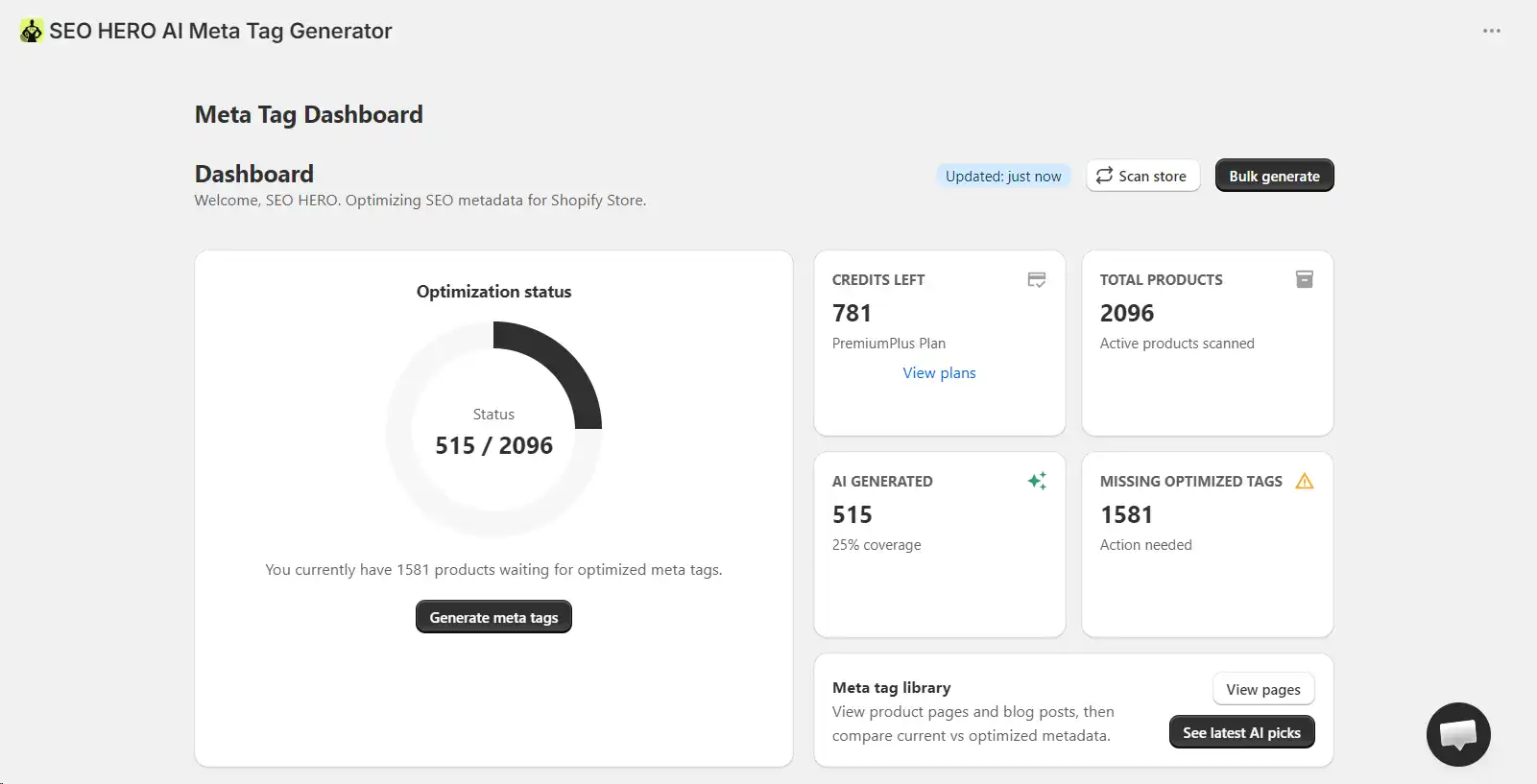
SEO HERO AI Meta Tag Generator can scan the store and summarize pages that need attention, including missing optimized tags, Shopify defaults, and overlength metadata. Use the dashboard as a work queue rather than treating every warning as equally urgent.
A catalog scan finds gaps in what you have. If you connect Google Search Console, AMTG adds the other half of the picture: the real queries your store already receives impressions for. It lists those queries with their status and impression volume, so a search like "seo for hvac" with hundreds of impressions and no matching metadata becomes visible as a priority. That lets you work from actual demand, not only from empty fields.
Shopify product exports include SEO Title and SEO Description columns. However, a blank exported field does not necessarily mean the live page has no title or description. Shopify explains that those fields are populated only when they have been manually customized; otherwise, the platform can use the product title and product description as defaults. Treat blank fields as "not customized" and evaluate the resulting live metadata before labeling them missing.
Read Shopify's product export note before building spreadsheet rules. Keep an untouched backup, do not sort a full product CSV casually, and test imports on a few low-risk products first.
A crawler can compare rendered title elements and meta descriptions across indexable product URLs, which helps expose duplicate or missing output caused by themes, apps, or templates. Google Search Console adds the performance layer: filter the Performance report by page, query, country, device, or date to find products that already receive impressions but attract fewer clicks than expected. Always compare CTR in the context of average position, query mix, SERP features, and seasonality.
For a broader store-wide review, use the Shopify SEO audit tool or a crawler to identify technical and content issues beyond metadata.
Track your findings in one place so the batch you select later is based on evidence, not guesswork. These columns keep opportunity, value, and problem severity visible side by side.
| Column | What to record |
|---|---|
| URL | Canonical product URL being evaluated. |
| Product title / H1 | Visible product identity and page heading. |
| Current meta title | Rendered title element, not only the exported CSV field. |
| Current meta description | Rendered meta description, when present. |
| Status | Missing / custom / default / duplicate / too generic / inaccurate / strong. |
| Organic opportunity | Impressions, current queries, CTR, average position. |
| Commercial value | Revenue, margin, stock status, conversion readiness, campaign importance. |
| Action | Keep, manually rewrite, bulk draft, exclude, or investigate. |
SEO HERO AI Meta Tag Generator drafts SEO titles and descriptions for your whole catalog in batches, so you review instead of write from scratch.
A strong Shopify meta title identifies the product quickly, uses the language a shopper is likely to recognize, and adds one meaningful differentiator without turning into a list of keywords. Start with the information that best matches intent, then add the brand only when it helps.
Flexible title pattern: Primary product or category + useful differentiator + optional brand.
A good Shopify product meta description is a factual preview of the page, not a compressed version of every product detail. State what the product is, add the most relevant differentiator or intended use, and finish with a natural reason to explore the page. The description should make sense even when read by itself.
Flexible description pattern: Product + differentiating facts + intended use or benefit + accurate next step.
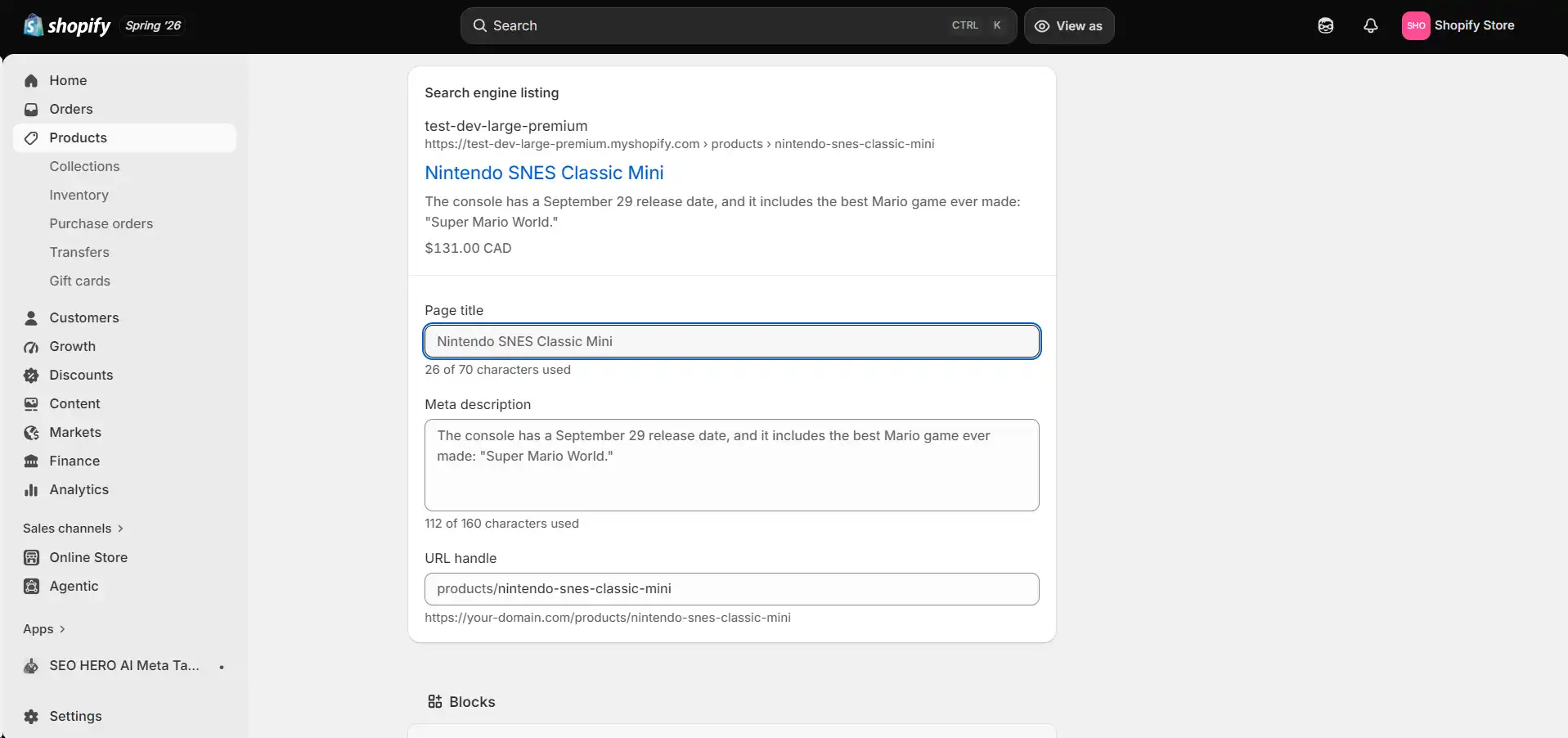
Manual editing is the best baseline for a small catalog, a single high-value product, or a page that needs careful custom copy. Shopify's exact interface can change, so confirm the labels in the current admin before publishing screenshots or instructions.
Shopify's current product instructions describe this same sequence: Products, product name, Search engine listing, pencil icon, Page title, Meta description, optional URL handle, and Save. See Shopify's official instructions for the latest wording.
Yes. Shopify supports product metadata updates through product CSV imports, and merchants can also use bulk-editing tools or Shopify apps. CSV is flexible and inexpensive, but it carries spreadsheet and overwrite risk. An app can reduce file handling and generate page-specific drafts inside a controlled workflow.
Shopify documents the SEO Title and SEO Description CSV columns and warns that overwrite behavior depends on which columns are present and blank. Read the current documentation before every large import.
CSV caution: Never treat a product CSV as a simple two-column spreadsheet. A malformed or sorted file can affect variants, images, and other product data. Keep an original export and prove the workflow on a small batch.
Connect Google Search Console and AMTG shows the real queries you already rank for, so you fix the pages with actual demand before the rest.
An AI-assisted workflow is most useful when the app can scan the catalog, use product context, generate drafts for selected pages, and keep a person in control of review and publication. The steps below reflect the current SEO HERO AI Meta Tag Generator materials and the supplied app screenshots. Available labels, page types, credits, and plan-gated features can change, so verify them before the article goes live.
Install SEO HERO AI Meta Tag Generator from the Shopify App Store or open it from the Apps area of Shopify admin. Because it is a Shopify app, the working catalog is available within the store context; use Scan store or Rescan store rather than describing a separate external catalog connector that the interface does not show.
Run the store scan and review the dashboard counts. Note how many pages are already AI-generated, still need metadata, or exceed the app's configured length guidance. Do not immediately select every warning. Compare the status with traffic, value, and product readiness.
Open Meta Tags to review the available product, collection, page, and blog-post records supported in the current account. The library lets you compare page names, current or generated metadata, status, and selection controls in one place.
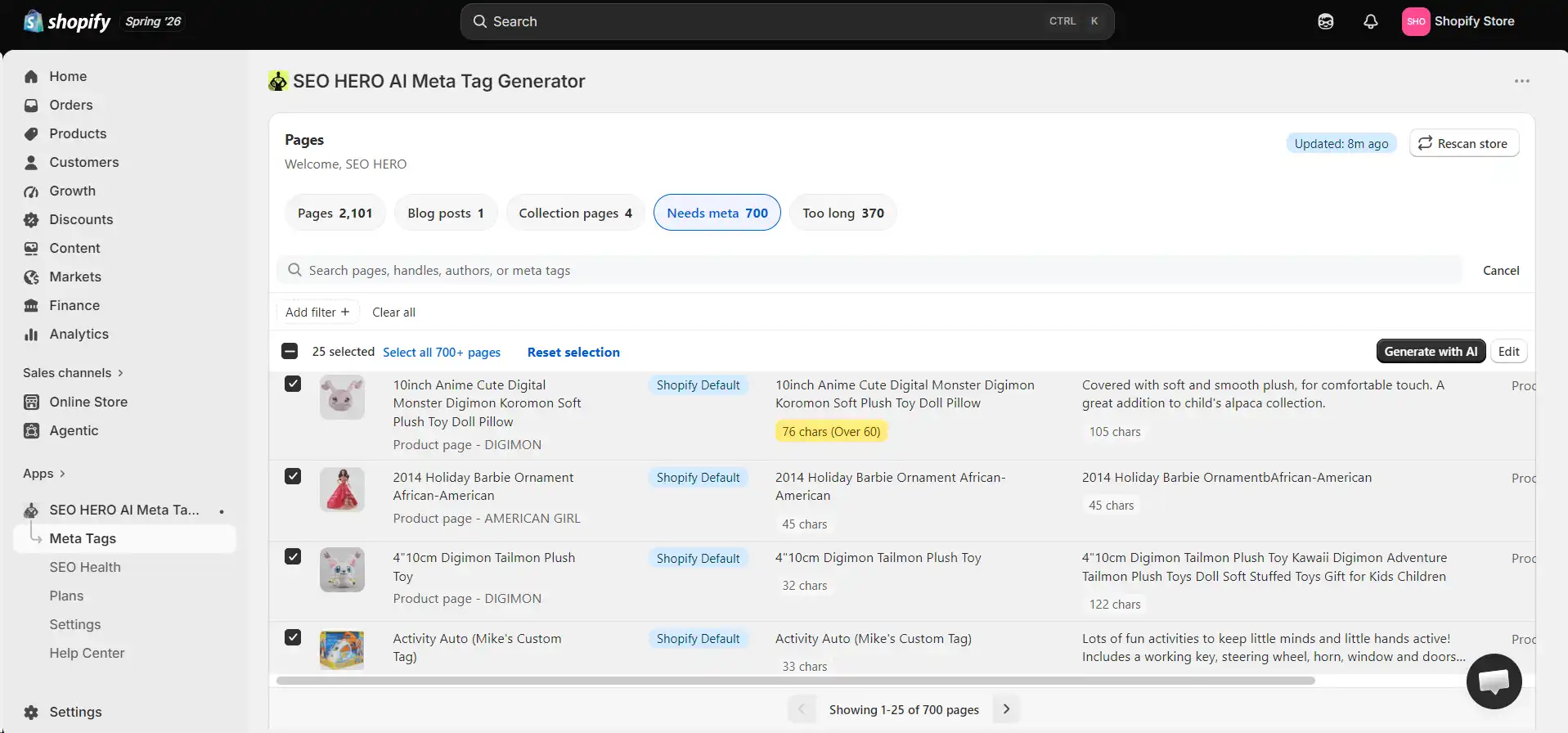
Use filters to narrow the queue to pages that are missing optimized metadata, still use defaults, have overlength tags, or match the product group selected for the project. A filtered pilot is easier to review than a store-wide first run.
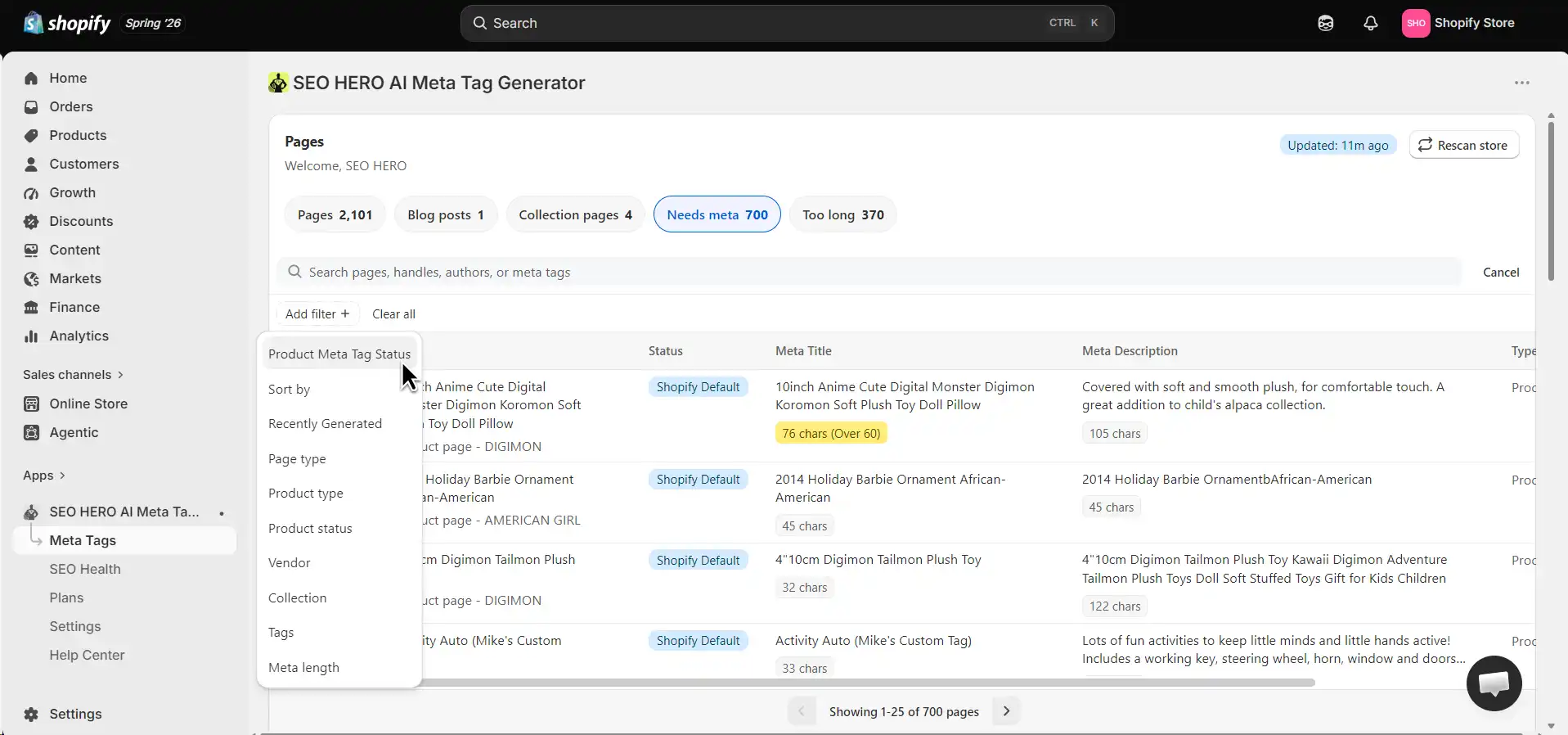
Start with 10–25 products that share a category or data pattern. Include a few edge cases, such as a long model name, sparse product copy, multiple materials, or a regulated claim. A pilot exposes weak rules before they affect hundreds of pages.
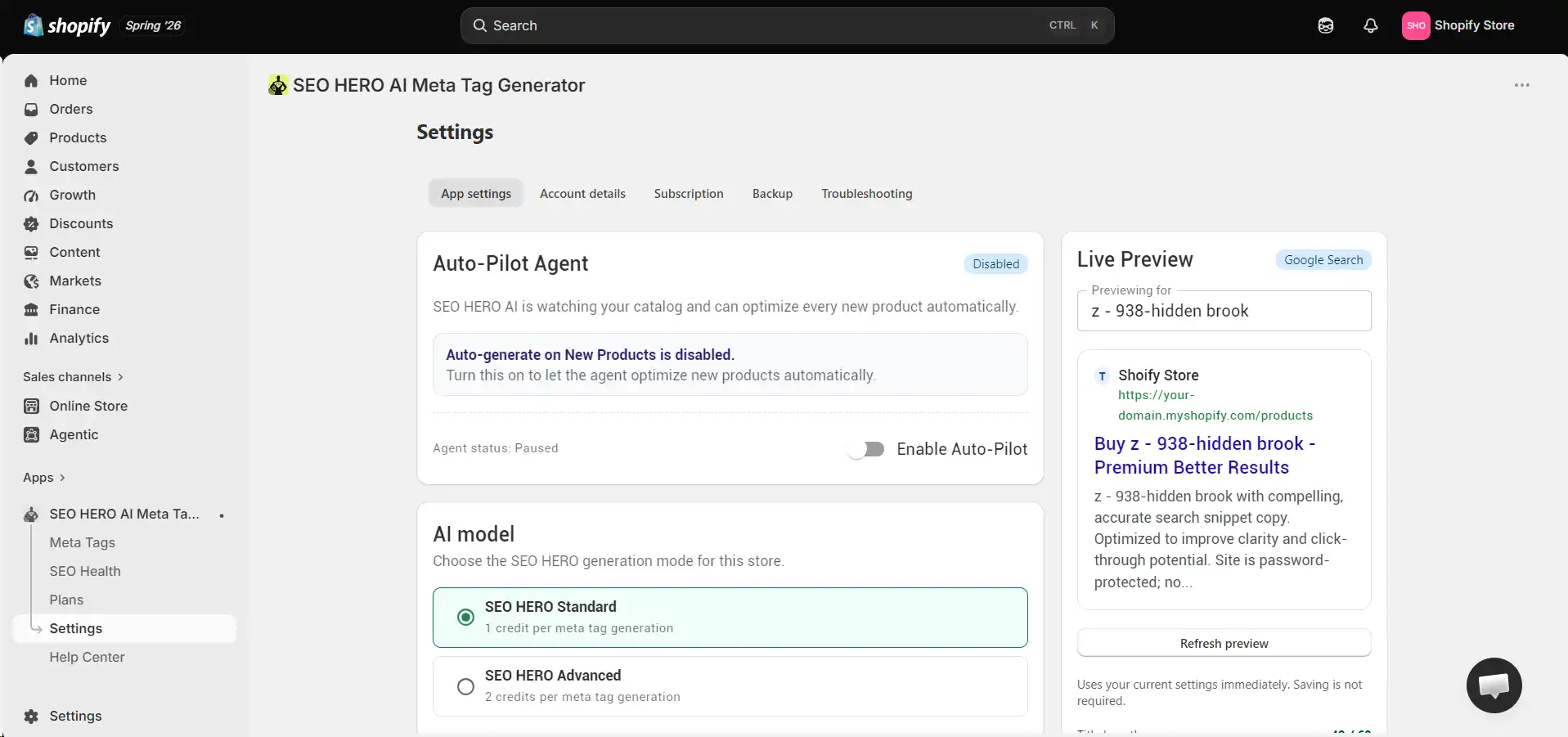
Open Settings and define the rules the app should use. Current AMTG materials show controls for language, tone, description format, title structure, copywriting mode, target keywords, brand terms, excluded words, unique selling points, custom instructions, business details, and product metafields. Use only settings supported in the live account and test a sample in the target language before a multilingual batch.
Generate drafts for the selected products. Use the app's Google-style preview and length guidance as QA aids, not as a promise that Google will display the exact text. If the first five outputs share the same weak phrase, stop and refine the rules rather than scaling the problem.
Open the selected records and review both fields. The current interface supports manual editing, which is essential for product names, sizes, materials, compatibility, claims, and brand terminology. High-value products should receive line-by-line human review before publication.
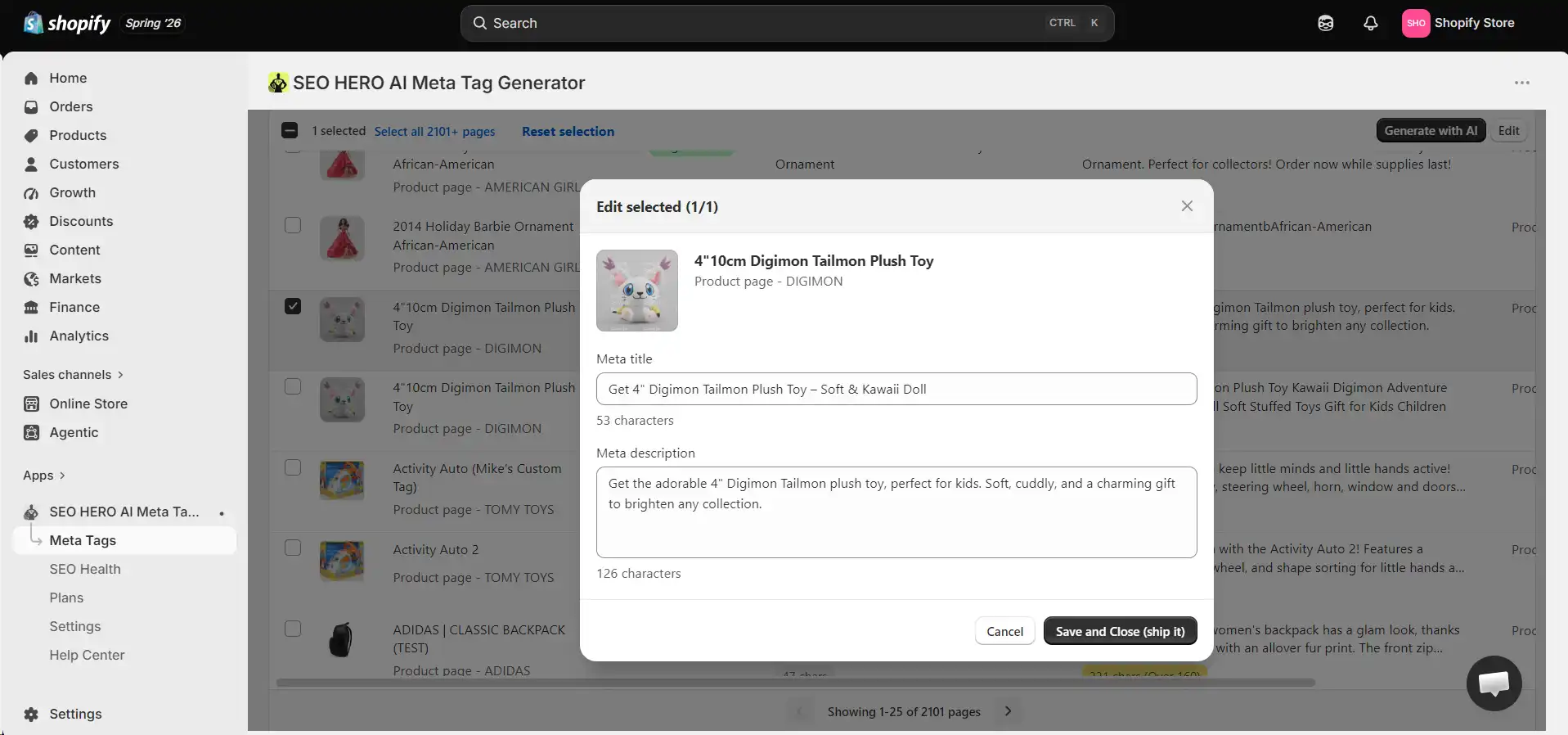
Publish only the reviewed records. Record the batch name, URLs, previous metadata, new metadata, reviewer, and date. After the update, allow Shopify time to synchronize, then rescan the store if the app recommends it.
Spot-check the rendered title element and meta description on representative products, not only the app screen. Check at least one normal product, one edge case, and one high-value product. Confirm that the search listing matches the visible product facts and that no unrelated fields or URLs changed.
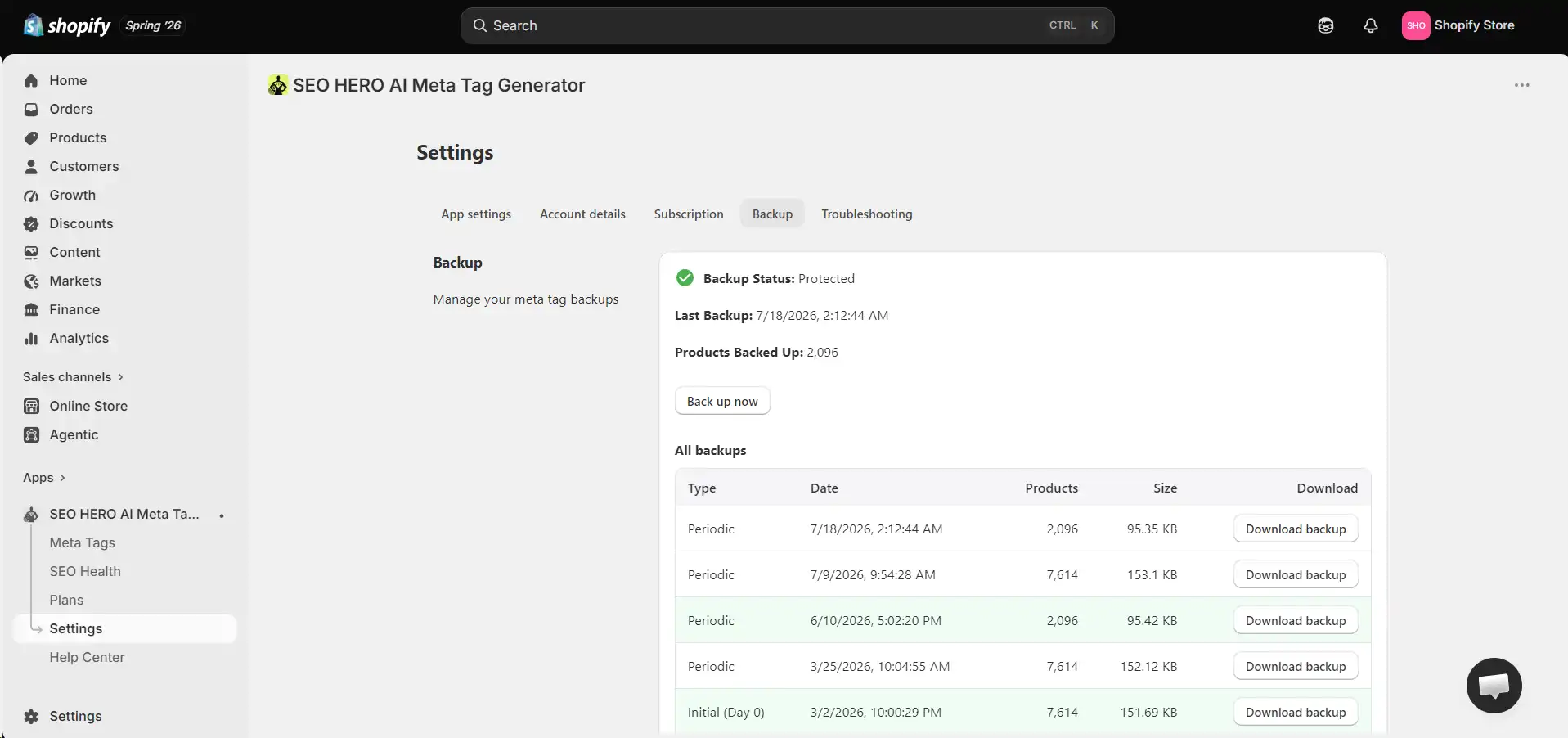
AMTG materials show backup, reapply, and troubleshooting tools. Use them, but keep a separate change log as well. A platform backup helps with recovery; an external log helps the SEO team understand what changed, why it changed, and how performance moved afterward.
Auto-Pilot is AMTG's automation agent for new products. When it is enabled, the app watches for newly created products and generates meta titles and descriptions for them automatically, so a new upload does not sit without a customized search listing. It runs on Premium and Premium Plus plans.
Turn it on only after your rules have passed a manual pilot and your source product data is consistently complete. Automation does not remove accountability for what gets published, so keep reviewing a sample of the new output on a regular schedule and confirm that the generated metadata still matches the live product page.

Instead of weeks of manual work, generate page-specific titles and descriptions in batches, review them, and publish only what you approve.
The examples below are hypothetical editorial examples, not performance case studies. Each improved version uses only the product facts stated in the example. No traffic or ranking result is implied.
Product facts available on the page: black stretch rib-knit midi dress, scoop neck, side slit, sizes XS–XL, machine washable. Brand: Northline.
| Field | Example |
|---|---|
| Original product title | Rhea Ribbed Midi Dress – Black |
| Original meta title | Dress | Shop |
| Original meta description | Shop our latest products. Great quality and fast shipping. |
| Main issue | The title is vague; the description is generic and could apply to every product. |
| Improved meta title | Black Ribbed Midi Dress With Side Slit | Northline |
| Improved meta description | Shop the Rhea black ribbed midi dress with a stretch-knit fit, scoop neck and side slit. Available in sizes XS–XL from Northline. |
| Why it is stronger | It identifies the product category, color, and differentiator while keeping the description factual and product-specific. |
Product facts available on the page: solid oak writing desk, 120 cm wide, two drawers, built-in cable opening. Brand: Harbor & Pine.
| Field | Example |
|---|---|
| Original product title | Rowan Solid Oak Writing Desk |
| Original meta title | Modern Furniture | Harbor & Pine |
| Original meta description | Model RWD-120 is constructed from selected timber according to manufacturer specifications. |
| Main issue | The title is duplicated across the furniture catalog; the manufacturer copy is technical but not useful to the likely query. |
| Improved meta title | Solid Oak Writing Desk With 2 Drawers | Harbor & Pine |
| Improved meta description | Create a focused workspace with the 120 cm Rowan solid oak writing desk, featuring two drawers and a built-in cable opening. |
| Why it is stronger | It states the product type and concrete features a shopper can verify on the product page. |
Product facts available on the page: 50 mL fragrance-free face cream with ceramides and squalane, intended for dry or sensitive-feeling skin. Brand: Aster.
| Field | Example |
|---|---|
| Original product title | Calm Barrier Ceramide Face Cream – 50 mL |
| Original meta title | Ceramide Face Cream Dry Skin Moisturizer Sensitive Skin Best Cream |
| Original meta description | Cures eczema, repairs your skin barrier overnight and guarantees soft skin. |
| Main issue | The title is stuffed with repetitive keywords; the description makes unsupported medical and guarantee claims. |
| Improved meta title | Fragrance-Free Ceramide Face Cream, 50 mL | Aster |
| Improved meta description | Moisturize dry, sensitive-feeling skin with a fragrance-free face cream made with ceramides and squalane. 50 mL. |
| Why it is stronger | It uses clear category and ingredient language without inventing a diagnosis, treatment, timeline, or guarantee. |
Product facts available on the page: 65W GaN wall charger, two USB-C ports, foldable plug, USB-C Power Delivery compatibility, cable not included. Brand: VoltEdge.
| Field | Example |
|---|---|
| Original product title | VoltEdge 65W Dual-Port USB-C GaN Charger |
| Original meta title | Charger – VoltEdge |
| Original meta description | Place your phone on this wireless charging pad for fast, cable-free charging. |
| Main issue | The description describes a different product and could create an immediate trust problem. |
| Improved meta title | 65W Dual-Port USB-C GaN Wall Charger | VoltEdge |
| Improved meta description | Charge compatible laptops, tablets and phones with a compact 65W GaN wall charger featuring two USB-C ports and a foldable plug. Cable not included. |
| Why it is stronger | It aligns with the actual product, surfaces compatibility and port details, and includes a relevant purchase qualifier. |
Product facts available on the page: small-batch vegan hot sauce with mango, habanero, and lime; 150 mL bottle; heat level 7/10. Brand: Ember Jar.
| Field | Example |
|---|---|
| Original product title | Mango Habanero Hot Sauce – 150 mL |
| Original meta title | Buy Hot Sauce Online | Ember Jar |
| Original meta description | Discover our delicious products, made with quality ingredients and shipped to your door. |
| Main issue | The same template appears on every sauce and contains no flavor, heat, size, or product-specific detail. |
| Improved meta title | Mango Habanero Hot Sauce, 150 mL | Ember Jar |
| Improved meta description | Bright mango, habanero heat and a squeeze of lime meet in this small-batch vegan hot sauce. 150 mL bottle; heat level 7/10. |
| Why it is stronger | It differentiates the sauce with flavor, dietary, size, and heat information that matches the page. |
Run this for every pilot batch and for a sample of every larger batch. Tick each item as you verify it. Your progress is not saved, so keep this open while you review.
Manual writing and AI-assisted generation solve different parts of the problem. Manual copy gives the writer maximum control; AI-assisted generation reduces repetitive drafting. The strongest workflow combines automation with human QA rather than treating either method as universally superior.
| Factor | Manual writing | AI-assisted generation | Recommended use |
|---|---|---|---|
| Speed | Slow per page. | Fast first drafts across batches. | Use AI for repetitive drafting; reserve manual time for review and priority pages. |
| Scale | Practical for a small catalog or selected URLs. | Practical for hundreds or thousands of structured products. | Use batches, not a blind store-wide first run. |
| Product specificity | Excellent when the writer researches the page. | Depends on the quality of product data and instructions. | Feed verified attributes and edit weak or generic output. |
| Brand consistency | Can vary by writer and time. | Can apply shared tone and rules consistently. | Create a documented voice guide and review samples. |
| Risk of inaccuracy | Human errors still occur. | AI may infer details or repeat unsupported claims. | Require factual QA for both methods; never assume automation is accurate. |
| Best page type | Flagship, regulated, unique, or high-value pages. | Structured product groups and recurring catalog work. | Use a hybrid model based on page value and risk. |
| Maintenance | Every update requires another manual edit. | Rules can support repeatable refreshes and new products. | Re-review rules whenever catalog data, positioning, or search intent changes. |
| Measurement | Easy to attribute when changes are few. | Needs careful batch logs because many URLs change. | Record every URL, old/new fields, date, keyword, and baseline. |
Metadata should be part of a broader product-page program. Review Shopify image SEO and alt text, technical issues, product content, internal linking, and structured data alongside search snippets. Stores that need a custom strategy for priority pages can also explore Shopify SEO services.
Optimize products that combine search opportunity, commercial value, and a clear metadata problem. Products already earning impressions usually provide more immediate learning than pages with no demand or no indexation. Missing metadata alone is not enough to make a page the top priority.
The score below is a planning tool, not an SEO formula. Assign points consistently, sort by total, then apply business judgment before selecting the batch.
| Factor | 0 points | 1 point | 2 points | 3 points |
|---|---|---|---|---|
| Organic impressions (last 90 days) | None or unverified | Low | Moderate | High |
| Commercial value | Low or unavailable | Some value | High revenue or margin | Strategic / flagship value |
| Metadata problem severity | Strong — keep | Minor clarity issue | Default / generic / inaccurate | Missing or duplicated on important pages |
| Ranking opportunity | Not indexed / no relevant queries | Below page three | Pages two or three | Use 0–2 only |
| Seasonal or launch urgency | No urgency | Later window | Active / near-term window | Use 0–2 only |
| Conversion readiness | Out of stock / weak page | Needs page work | Ready to convert | Use 0–2 only |
Suggested priority bands: 11–15 points: high priority. 7–10 points: medium priority. 0–6 points: defer, investigate, or improve the page before spending metadata effort.
AMTG writes accurate, product-specific meta titles and descriptions from your real product data, with a human review step you stay in control of.
SEO HERO AI Meta Tag Generator is best positioned as a workflow assistant for creating and reviewing first drafts at scale. It can reduce repetitive work for stores with large catalogs while keeping the merchant responsible for strategy, product facts, and final approval.
For a side-by-side software-selection guide, see best Shopify meta tag generator apps. This tutorial remains focused on the workflow rather than ranking competing apps.
Measure metadata changes with a baseline, a dated change log, and enough time for recrawling and normal search variation. Do not assume every title or description update will improve rankings, traffic, or CTR. A clearer snippet can help qualified searchers choose the page, but outcomes also depend on position, query intent, SERP features, competitors, seasonality, indexing, and the quality of the product page.
A batch of related products is easier to review and analyze than a store-wide change. For a large catalog, stagger updates by category or priority band. Where practical, keep a comparable group unchanged for the same period; this is not a perfect experiment, but it can provide context for broader demand shifts.
Use the Search Console Performance report to compare periods and filter by page, query, device, country, and search appearance. Track whether the changed pages gain or lose impressions, clicks, CTR, average position, or query coverage. Inspect query-level changes before concluding that a title worked or failed: a page can gain more broad impressions and show a lower CTR even while earning more qualified clicks.
Google documents clicks, impressions, CTR, average position, queries, pages, countries, devices, and date comparisons in the Search Console Performance report.
AMTG can connect directly to Google Search Console and import your page-level search performance. Once a property is synced, the app pulls in the real queries your store already receives impressions for and lists them with their status, impression volume, and coverage, so you can see which searches have no matching metadata yet. A built-in query-gap review compares those Search Console queries against your current meta titles and descriptions, which turns your own search data into a prioritized work queue instead of a guess.
This is a prioritization and monitoring layer, not a source of guaranteed outcomes. The data is still Google's, and the same cautions about average position, query mix, and seasonality apply. Use it to decide which pages to work on first, then measure the result the same way you would any other change.
For the merchant, compare organic product-page sessions, conversion rate, transactions, and revenue alongside Search Console metrics. For this AMTG article, also track clicks to the AMTG landing page and Shopify App Store, CTA location, device type, and install-intent actions when measurable. A post can succeed by attracting qualified solution-aware readers even when raw page traffic is modest.
| Field | Example or instruction |
|---|---|
| URL | Canonical product-page URL. |
| Previous title | Exact title element before the change. |
| Previous description | Exact meta description before the change. |
| New title | Approved replacement. |
| New description | Approved replacement. |
| Date changed | YYYY-MM-DD and time zone. |
| Primary keyword / intent | Main query theme the page genuinely addresses. |
| Baseline impressions | Comparable pre-change period. |
| Baseline CTR | Interpret with position and query mix. |
| Follow-up results | Clicks, impressions, CTR, position, query changes, traffic, and conversions. |
| Notes | Stock, promotions, page edits, indexing issues, or other confounders. |
Use a product CSV, a bulk-editing tool, or a Shopify meta description generator that creates page-specific drafts from product data. Start with a filtered pilot, review for accuracy and duplication, publish approved records, and verify the live output before scaling.
Yes. Shopify product metadata can be updated through product CSV imports, and merchants can also use bulk editors or apps. The individual product screen remains useful for manual edits; CSV and app workflows are more practical for larger catalogs.
Yes. AI can create first drafts from product titles, descriptions, attributes, keywords, and brand instructions. The merchant should still review product facts, claims, search intent, uniqueness, tone, and live rendering before publication.
Every important, indexable product should have a page-specific description that accurately represents that product. For very large catalogs, programmatic or AI-assisted descriptions can be appropriate when they are readable, diverse, and based on reliable page data.
A good title identifies the product or category quickly, uses natural query language, includes a useful differentiator, and stays concise enough to remain readable. It should not be a list of keywords or a promise the page cannot support.
A good description summarizes the product with accurate, relevant facts and gives a qualified reason to click. It should match the likely search intent, avoid generic filler, and remain useful even if read outside the rest of the page.
Scan the catalog with an app or crawler, inspect rendered title and description elements, and compare a Shopify product export. Remember that blank SEO fields in an export can mean Shopify is using the product title or description as a default rather than outputting nothing.
Yes. Google can create a title link from multiple page signals and can build a snippet from visible page content instead of the submitted meta description. Write strong metadata as a preferred suggestion, not as guaranteed display text.
No fixed rule requires it. Add the brand when it builds recognition, distinguishes the product, or fits without displacing more useful product information. Test title patterns by category rather than appending the store name mechanically.
There is no universal schedule. Update it when the product, positioning, search intent, season, inventory, or query data changes; when duplicates or inaccuracies are found; or when a well-ranked page has a persistently weak snippet. Avoid routine churn without a reason and baseline.
Not by itself and not reliably. A clearer title can help search engines and searchers understand the page, and a better snippet may influence click behavior, but rankings also depend on relevance, content, links, technical quality, competition, and many other signals.
AI output can create problems when it is inaccurate, duplicated, keyword-stuffed, or inconsistent with the page. The issue is the quality and truthfulness of the published content, not the mere use of AI. Human review and reliable product data reduce the risk.
Yes. Review every pilot and high-value product, then sample every larger batch. Check names, materials, sizes, ingredients, compatibility, benefits, claims, tone, uniqueness, and whether the page supports the final wording.
The product title is the catalog and merchandising name used throughout Shopify. The meta title is the page title element intended for search and browser contexts. They can match, but the meta title can add category or differentiating language when that improves clarity.
Yes, when the selected tool and account support the target language. Configure the intended language, provide localized product facts and keywords, generate a small sample, and have a fluent reviewer check meaning, claims, terminology, and market fit before a bulk rollout.
Use a hybrid system: audit and prioritize pages, define category-specific rules, generate drafts in controlled batches, manually review priority products, publish with backups, and measure the result. This combines scale with factual and strategic control.
A meta description is not a dependable direct ranking lever. It can influence how the result is presented and whether a qualified searcher clicks, while Google may show a different snippet. Evaluate changes with clicks, impressions, CTR, position, and query data together.
Choose a tool that supports page-specific bulk drafts, product context, configurable rules, manual review, accurate publishing, and recovery options. SEO HERO AI Meta Tag Generator is a metadata-focused option for stores that want this workflow inside Shopify; compare current features and plans against your catalog needs.
The safest way to generate Shopify meta titles and descriptions in bulk is to combine automation with a documented review process. Audit the catalog, start with pages that already have search and commercial opportunity, define rules from accurate product data, generate a manageable batch, review the output, publish only approved changes, and measure the result over time. Manual writing remains the right choice for priority and high-risk pages; AI-assisted generation is a practical first-draft system for the rest of a large catalog.
Metadata is one piece of Shopify SEO. It can make a page's topic and search presentation clearer, but it does not replace technical health, useful product content, internal links, structured data, image optimization, or a page that converts the click.
Hey, I’m Mike Belanger, a business enthusiast with over 15 years of experience in designing, web and app development, business management, digital marketing, customer psychology and optimizing businesses. I love making businesses grow and operate smoother.