By
Mike
By
Mike
A Shopify SEO checklist is a step-by-step way to check whether your store's important pages can be found, understood, and matched to the searches that bring real buyers. Most checklists dump a hundred tips on you and leave you to guess where to start. We wanted to build something different: the exact order of operations we use, covering what to check, why it matters, how to fix it, and which parts you can safely speed up with a tool.
We've helped plenty of Shopify owners who felt stuck in the same spot. They know SEO drives sales. They just can't tell which fix moves the needle. So let's cut the noise and give you a plan you can start this week.
TL;DR: Work in order of impact, not page by page. Fix blockers first, meaning indexing, canonicals, redirects, and broken high-value URLs. Then improve the products and collections that already earn impressions, tighten your titles and meta descriptions, clean up images and speed, and add content that answers real buyer questions. Treat AI search as strong SEO plus original, first-party evidence. Audit light monthly, deep quarterly, and after any big store change. Short on time? SEO HERO AI Audit Tool scores every page and sorts the fixes by priority.
Quick answer: A Shopify SEO checklist is a repeatable review of your store's crawling, indexing, product pages, collection pages, metadata, images, internal links, content, structured data, and speed. Its job is to show you what to fix, help you fix it in the right order, and let you confirm the change actually worked.
Here's the part beginners get wrong: SEO is not one setting you flip on. Shopify handles a few foundations for you, like a sitemap, robots file, canonical tags, and SSL. But you still control the parts that win rankings, such as unique product copy, your collection structure, internal links, image quality, theme speed, and whether each page matches what people are actually searching for. Shopify's own SEO overview spells out what the platform gives you by default.
A good checklist does more than say "write better title tags." It tells you which pages to touch first, how to spot a real problem, how to fix it inside Shopify, and how to check that it stuck. That's the difference between busywork and results.
Shopify SEO problems hide at three levels, and each one needs a different fix. Treating them all as one-off page edits is how people waste weeks. A checklist helps you see which level you're really dealing with.
| Level | What it looks like | Where the fix lives |
|---|---|---|
| Storewide | A bad robots rule, a rogue app script, or a broken navigation pattern | Shopify admin, theme, or an app |
| Template | Every collection using the same thin layout, or every product inheriting weak boilerplate | Theme or a bulk workflow |
| Page-level | One high-value product with a duplicate title, stale copy, or no internal links | That single page |
AI search raises the stakes too. Google's 2026 guidance is clear that the basics still apply to AI results: pages need to be reachable, indexable, useful, and backed by original content you can't copy from anyone else. There's no magic AI schema and no special file that unlocks AI Overviews. If your fundamentals are strong, you're already most of the way there.
If reading all this already feels like a lot, that's normal. Plenty of owners would rather hand it off, and we're happy to take a look at your store together and map out the quick wins. Either way, the same checklist applies.
We looked at setup-wizard responses from real Shopify owners using our audit tool. The pattern was loud and consistent: people don't want another giant list. They want to know what to fix first and stay in control of any AI changes.
Source: SEO HERO first-party setup-wizard data, July 2026. Some questions allowed multiple answers, so totals can pass 100%. No store-identifying data is included.
Those answers shaped how this checklist is built. It leads with what to fix first. It gives extra weight to product pages, since most stores sell physical goods. And it treats every AI suggestion as something you approve, not something that happens behind your back.
Don't audit every URL like it matters equally. A missing meta description on a dead tag page is not worth your time. A canonical error on your best-selling collection is. Work in this order of impact:
For fast triage, we score each issue with a simple formula. It isn't a Google metric. It just stops low-value cleanup from stealing time from revenue work.
A duplicate title on a high-margin product sitting just off page one might score 3 × 3 × 3 ÷ 1 = 27. A missing description on a dead archive page scores 1 × 1 × 1 ÷ 2 = 0.5. The math makes the choice obvious: fix the 27 first.
| Priority | Fix these examples first |
|---|---|
| P0 Blocking | Important URLs blocked, accidental noindex, wrong canonical, redirect loops, broken mobile content |
| P1 High | Duplicate or missing titles on pages with impressions, thin priority collections, weak product copy, broken internal links |
| P2 Improve | Alt-text gaps, schema enhancements, secondary internal links, image weight, content refreshes |
| P3 Expand | New comparison pages, glossary content, long-tail guides, localization |
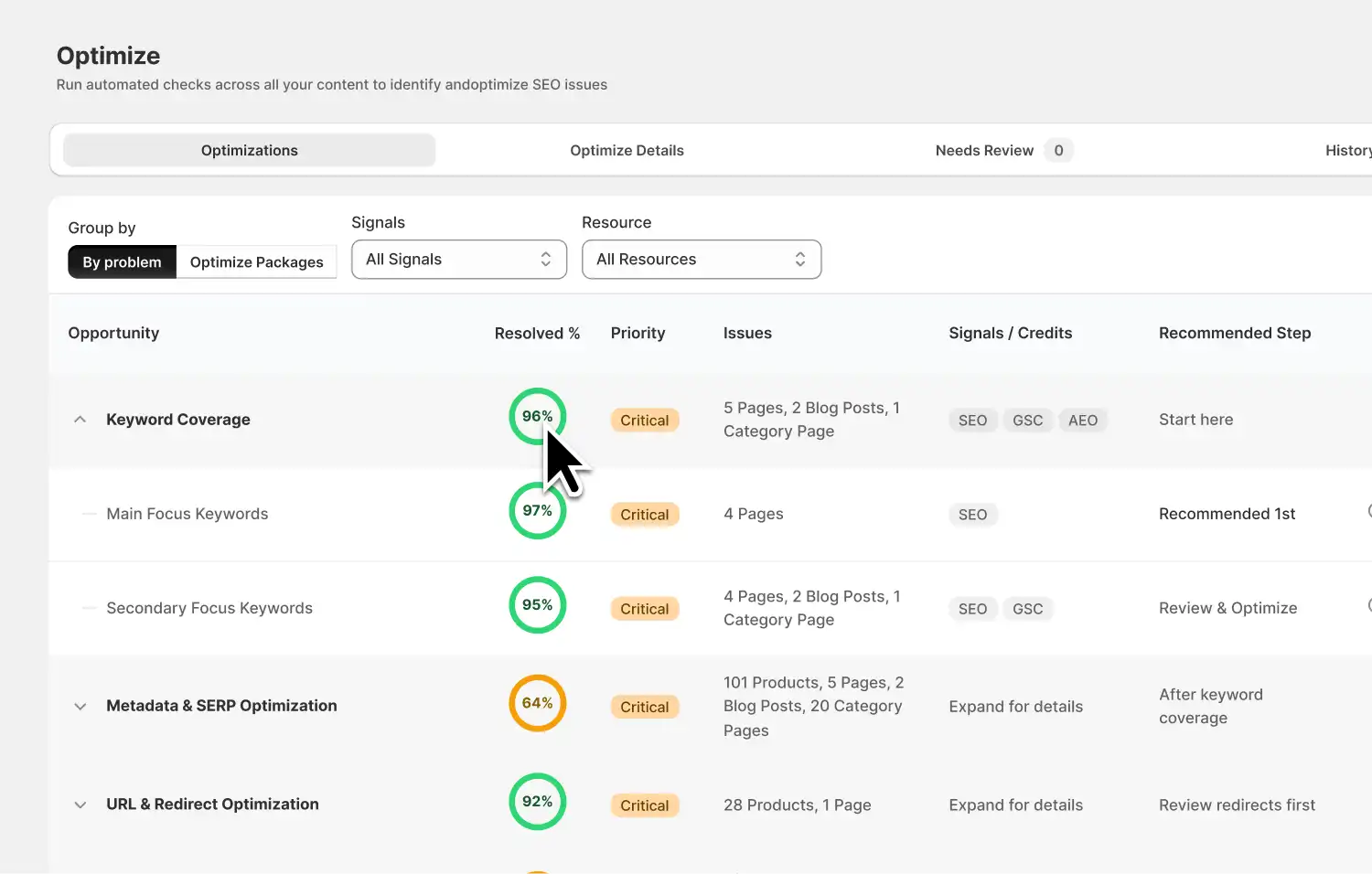
SEO HERO AI Audit Tool scores every product and page, then sorts the fixes by priority so you always know what to do next.
Technical SEO is about access. Can search engines reach the right pages, skip the junk URLs, and understand which version you actually want ranked? Start here, because a single technical blocker can hold back your whole store.
First, confirm your priority pages are indexable. Check the homepage, top collections, top products, and key articles in Google Search Console's URL Inspection tool. Each should return a 200 status, avoid an accidental noindex, and be published to your Online Store channel. If a page is hidden, the fix is usually removing bad noindex logic, publishing it, or repairing a theme condition, not blocking it in robots.txt.
Next, review the files Shopify builds for you. Open your sitemap.xml and confirm it lists the products, collections, pages, and blogs you want found. Then open your robots.txt and watch for a broad disallow rule that an app or theme edit may have added. A bad edit to the robots file can quietly cost you traffic, so only customize it with a clear reason and a rollback plan.
Canonicals are where a lot of stores leak ranking signals. Inspect the source of a few product, collection, and filtered URLs. Indexable pages should point to themselves, and alternate paths should point to the main product URL. Apps and custom themes sometimes output two conflicting canonical tags, so check for that too.
Duplicate content on Shopify usually follows patterns, not random pages. Fix it by pattern and you fix dozens of URLs at once. The usual suspects:
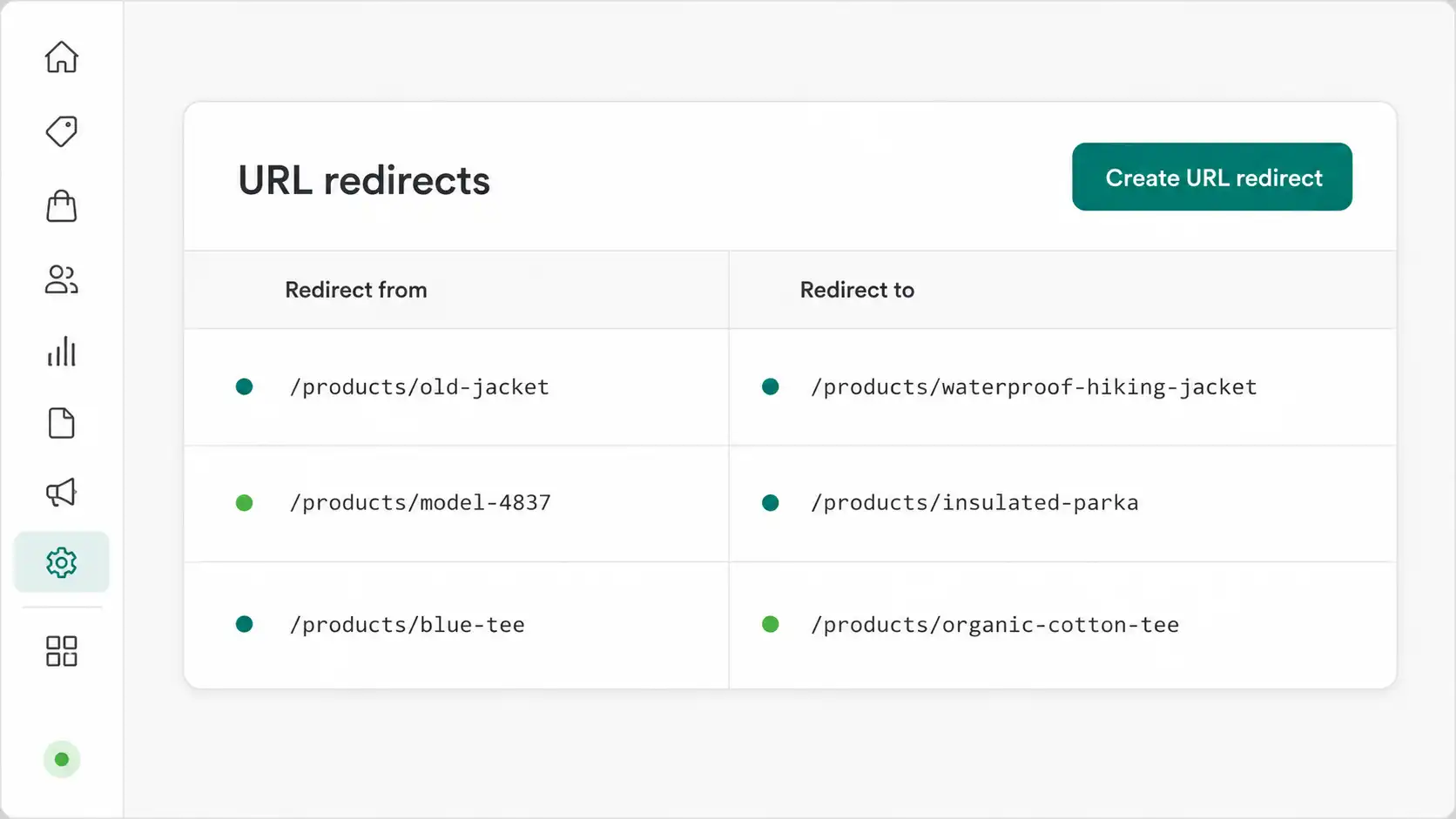
Then handle broken links and redirects. Crawl your internal links for 404, 5xx, and redirect loops, and point internal links straight to the final URL. When you retire a product, don't send everything to the homepage. Match the action to the situation.
| Situation | Best action |
|---|---|
| A close replacement exists | 301 redirect to the replacement product |
| Product gone, category still useful | Redirect to the closest relevant collection |
| Temporarily out of stock | Keep the page live, show status, offer a restock alert |
| Has links or demand, no replacement | Keep an informative retired-product page |
| No value, no replacement | Return a real 404 or 410 |
Finally, don't forget speed. Test the homepage, a product, a collection, and a content page, because they behave differently. Google's "good" targets for 2026 are simple to remember:
On Shopify, the usual culprits are oversized hero images, sliders above the fold, and review or chat scripts fighting for the main thread. Use Search Console field data and PageSpeed Insights to confirm, and read Google's Core Web Vitals guidance for the thresholds. Just don't chase a perfect lab score at the cost of conversions.
On-page SEO makes sure each important page has one clear job, a descriptive title, useful content, and links that help shoppers keep moving. A page can rank for many queries, but it should have one main purpose.
| Page type | Primary job |
|---|---|
| Homepage | Brand and broad category discovery |
| Collection | Browse and compare a product category |
| Product | Evaluate and buy one specific item |
| Buying guide | Learn how to choose between options |
| Support article | Solve a post-purchase problem |
For your title tags, put the most useful words first and match the real page content. Skip empty boilerplate like "Product — Store Name," and keep every title distinct across the store. Around 50 to 60 characters is a practical range, but it isn't a ranking rule. Google may rewrite a vague or repetitive title anyway, so make yours accurate and specific.
Give each page one clear H1 that describes it, and use H2s and H3s to organize benefits, specs, FAQs, and comparisons. Your opening copy should say what the page offers and who it's for, fast. Don't write a keyword-stuffed paragraph just to fill space above the fold; the goal is to reduce uncertainty for a real shopper.
Thin or copied body text is a common drag. Replace reused manufacturer copy with facts only your store can offer, like fit, materials, compatibility, care, and shipping. There's no magic word count. A page just needs enough original detail to answer the decision it's asking the visitor to make. And check the live search results by hand: if Google shows mostly collections for a query, a single product page probably won't win it.
For most stores, product pages are where SEO, merchandising, and conversion all meet. They deserve the most care. This blueprint keeps every important detail in view.
| Page area | What to include |
|---|---|
| Above the fold | Descriptive name, price, availability, variant picker, clear CTA, key delivery info |
| Core details | Benefits, specs, materials, dimensions, compatibility, fit, care, what's included |
| Decision support | FAQs, shipping, returns, warranty, sizing help, real reviews |
| Discovery | Clear images, video where useful, related products, guides |
| Machine-readable | Accurate Product and Offer schema: price, currency, availability, canonical URL |
Start with a title that identifies the item to someone outside your catalog. "Classic Tee" tells a shopper nothing. "Women's Heavyweight Organic Cotton T-Shirt" does the work. Then write a unique description that explains who the product is for and backs up its benefits with real facts, not just adjectives.
Most weak product pages aren't missing words; they're missing answers. The sizing detail, the compatibility note, the return window, the care instructions: this stuff often lives in your support chat instead of on the page. Move it onto the page as clear copy and visible FAQs, and you'll reduce both bounces and returns. Keep those FAQ answers in the HTML, since rich results are never guaranteed.
Handle variants on purpose. Keep one canonical product URL when a parameter only changes a selectable option, and use separate URLs only when a variant has its own demand and content. Keep variant price, availability, SKU, image, and schema in sync. Google's Search Central documentation covers the technical side if you sell complex variant families.
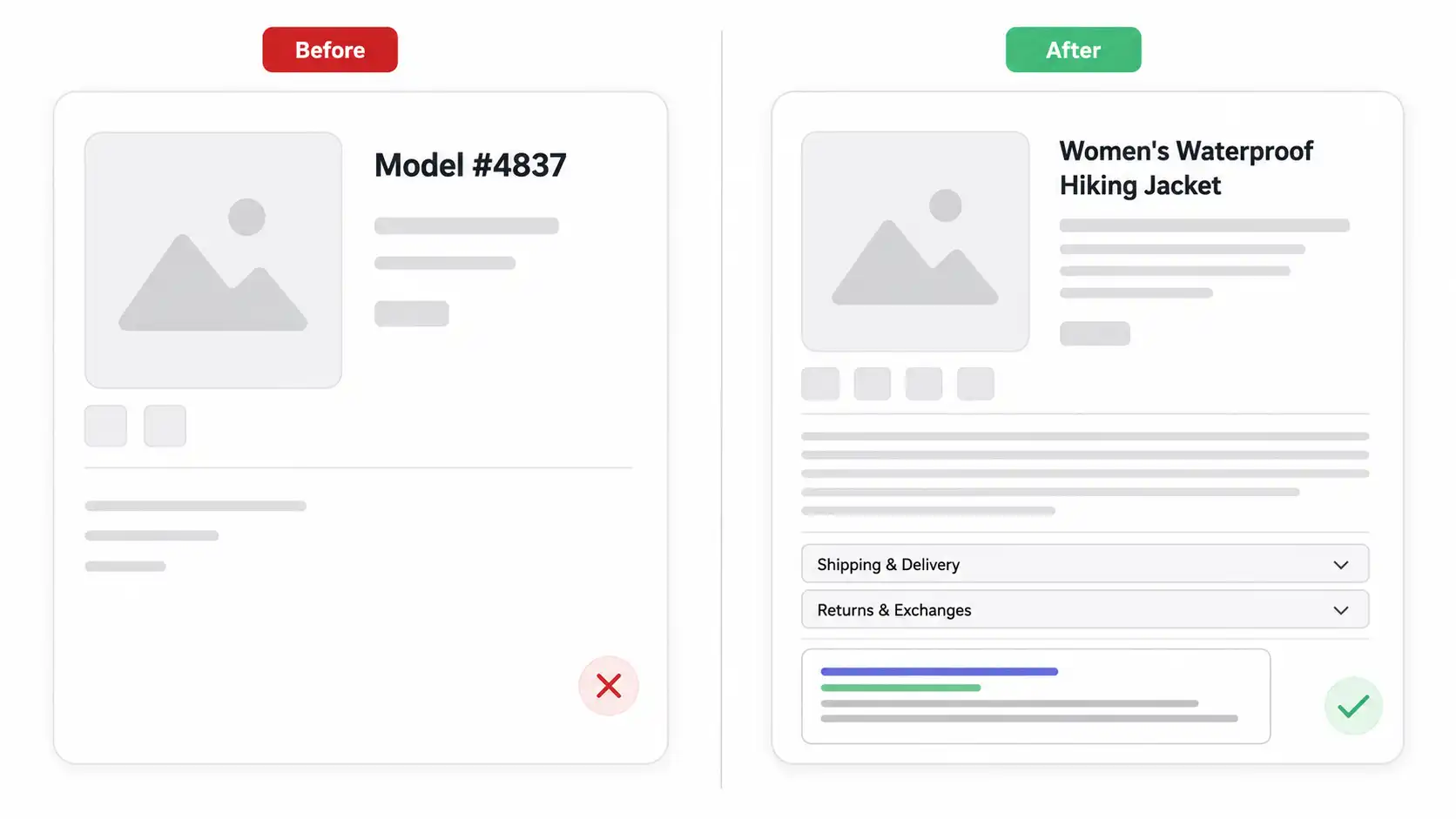
Say you've got a product page for a waterproof hiking jacket. The title is just an internal model number, the meta description is copied across 40 products, the hero image weighs several megabytes, and the schema is missing availability. The instinct is "write more words." That's the wrong first move. Do this instead:
Audit product SEO in bulk, preview every AI fix before it goes live, and keep a full before-and-after history.
A collection page should help shoppers compare a category while giving Google enough context to understand the group. A thin grid with a generic H1 is rarely the strongest category landing page. Give every priority collection a clear purpose, whether that's a style, a material, an audience, or a problem it solves.
Write a descriptive H1, a unique title tag, and a short, useful intro above the product grid. If you want to add a deeper buying guide, put it below the products so shoppers see the goods first. Keep the grid clean with accurate names, prices, availability, and images, and make sure any pagination is crawlable in the rendered HTML.
Filters are the classic collection trap. They're great for shoppers but can spin up thousands of thin, near-empty URLs. Keep a filtered page indexable only when it has real search demand, stable inventory, and its own metadata. Everything else should be consolidated or kept out of the index. If two of your own pages fight for the same query, pick the winner and reposition the others around supporting intents.
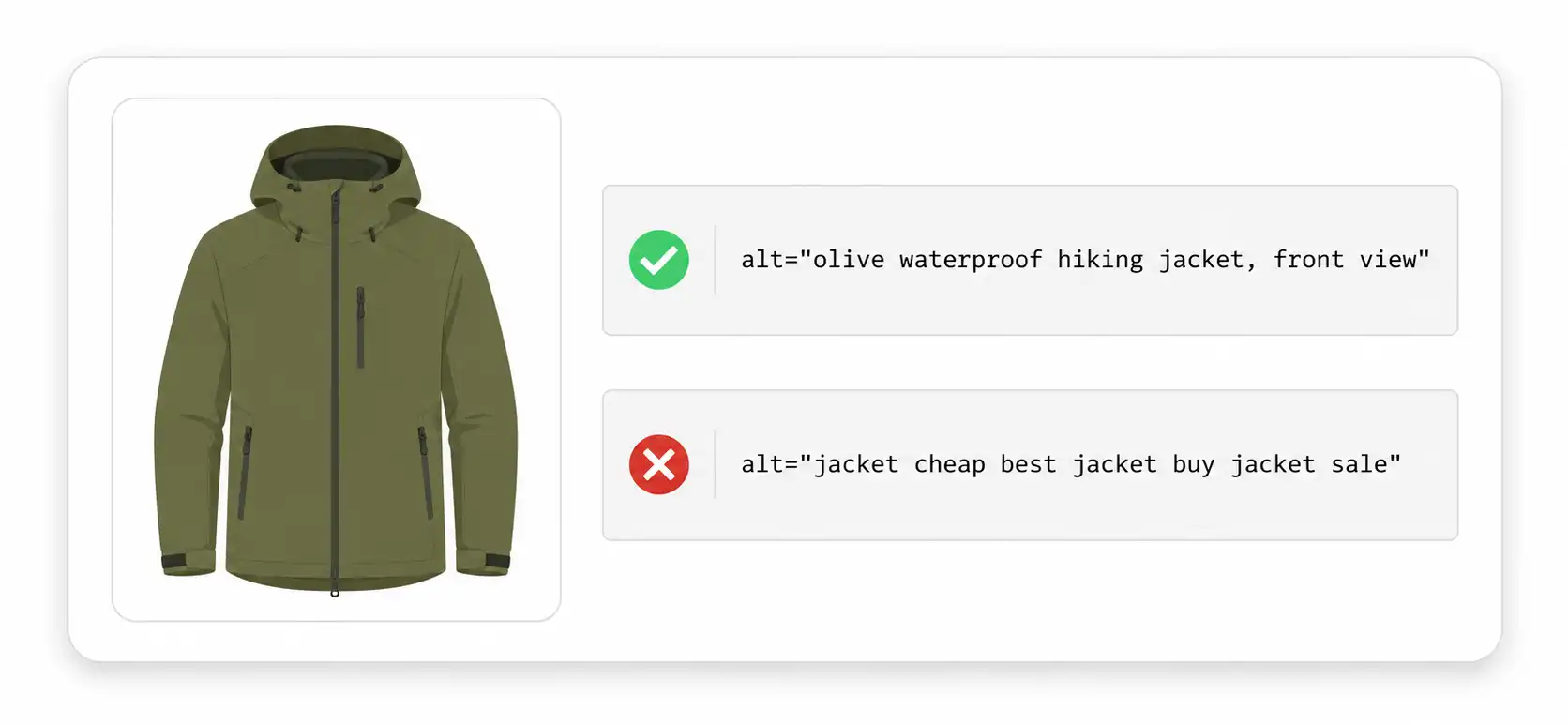
Image SEO improves accessibility, image understanding, and page speed at the same time. Alt text matters, but it's only one piece. Use a simple pattern for meaningful product images: [product type] + [key attributes] + [view or context]. For example, Women's olive waterproof hiking jacket, front view with hood raised.
Describe what's actually visible, and don't start every line with "image of." Skip decorative images with empty alt text (alt=""), and never paste the same keyword-stuffed alt text onto every gallery shot. Google uses alt text, page context, and the picture itself to understand images, and it recommends descriptive filenames too.
Speed is the other half. Upload enough resolution for detail without shipping giant files, serve responsive sizes, and reserve width and height to stop layout shift. One rule saves a lot of Core Web Vitals pain: never lazy-load your LCP image, which is usually the main product or hero shot. If you'd rather batch this across a big catalog, a dedicated alt-text tool can help, but the core review still belongs on your checklist.
SEO HERO AI Audit Tool runs the same checks against your live store, gives you a score, and sorts every fix in priority order.
Good content SEO removes the questions that block discovery or purchase. It does not mean spinning up hundreds of thin pages for keyword variations. The best source of ideas is already sitting in your business: support tickets, product reviews, on-site search terms, Search Console queries, and questions your sales team hears every day.
Whatever you publish, link it to the right commercial page and link that page back to helpful content. Group related pieces into a hub around one category instead of scattering isolated posts. And when you refresh a page, change the content and the date only when you've actually reviewed it. Google's own helpful content guidance rewards this kind of genuine, first-hand usefulness.
Metadata has one job: identify the page, match the intent, and make the search result easy to click. It should never read like a compressed pile of keywords. For titles, confirm every important page has one, that they're unique across the store, and that the product or category shows up early. Add your brand once, usually at the end.
For descriptions, give each priority page a unique, accurate line that explains what the shopper will find and includes a real differentiator like material, range, or shipping. Around 140 to 160 characters is a comfortable editing range, though Google doesn't enforce a length and may write its own snippet. These starting patterns help, but the final copy should always match the actual page.
| Page type | Starting pattern |
|---|---|
| Product | {Product name} – {key attribute or use} | {Brand} |
| Collection | {Category} for {audience or use} | {Brand} |
| Buying guide | How to Choose {product category}: {angle} |
| Comparison | {Option A} vs. {Option B}: {decision criteria} |
We turned the full checklist into a quick self-assessment. Tick off what your store already does and watch your readiness score update. Nothing is saved, so screenshot it if you want a record.
GEO and AEO sound like new disciplines, but in 2026 they're mostly excellent SEO plus original evidence. To be quoted accurately by AI Overviews, ChatGPT, Perplexity, or Gemini, your page needs to be indexable, answerable, and backed by something a generic summary can't copy. The strongest pattern is answer-first:
It's just as useful to know what you don't need. According to Google's 2026 guidance, none of these unlock AI search:
The survey data earlier in this guide is a small example of the right approach. It's original, it's clearly sourced, and it shows how real Shopify owners think. That kind of first-party evidence is exactly what makes a page worth citing, in both classic search and AI answers.
Working through this list by hand is doable, but slow, especially past a few dozen products. That's the exact problem we built SEO HERO AI Audit Tool to solve. It's a Shopify-native audit tool that turns a long checklist into a prioritized review-and-fix workflow, with you in control of every change.
It's honest about its limits, too. Some tasks are a great fit for automation; others still need your judgment or a developer. Here's the split so you know what to expect.
| Task | SEO HERO helps | Keep human or theme review for |
|---|---|---|
| Missing or duplicate titles and meta | Audit plus AI and bulk fixes | Final accuracy, brand voice, offer claims |
| H1s, opening copy, content quality | Checks and contextual tips | Merchandising calls and fact-checking |
| Google Search Console data | Read-only connect, sync, and metrics | Attribution, seasonality, strategy |
| Bulk changes | Preview, history, and restore | Sampling, approvals, post-publish QA |
| Product structured data | Product-page JSON-LD workflow | Collection, article, and FAQ schema strategy |
| Core Web Vitals and theme scripts | Helps you prioritize | Theme code and performance engineering |
We won't pretend it fixes every technical issue automatically, because it doesn't. It's strongest when you need to spot repeated problems, prioritize the work, use real Search Console context, generate supported fixes, and keep a rollback path. That review-before-apply control is the feature owners asked for most.

Quick answer: Run a light audit every month, a deep audit every quarter, and an extra audit after any big change: a new theme, an app install or removal, a domain move, a URL restructure, a large import, or a new market. High-change stores should watch indexing and redirects weekly.
| How often | What to review |
|---|---|
| Weekly | New and deleted products, fresh broken links, critical Search Console errors |
| Monthly | Priority-page scores, titles, metadata, internal links, CTR opportunities |
| Quarterly | Full template crawl, canonicals, filter URLs, schema, Core Web Vitals |
| After changes | Theme launch, app change, migration, bulk import, market launch |
The fastest reliable method combines an automated audit with Search Console data, then reviews changes in priority order before publishing. Automation finds the repeated patterns, Search Console shows where the demand is, and your review protects brand accuracy and the tricky edge cases. Run it as a five-step loop:
A 30-day checkpoint is handy for planning, but it isn't proof that one edit caused a ranking change. Seasonality, competitors, and inventory all move results too, so treat the data as direction, not certainty.
The most effective Shopify SEO checklist isn’t the longest one. It’s the one that helps you make the right change, on the right page, in the right order. Start with crawlability and indexing. Consolidate duplicates. Improve the products and collections that already show demand. Then add useful content, clean images, and original evidence.
Above all, keep control of the workflow: audit, prioritize, preview, apply, verify, and always keep a way to undo. Do that on a monthly rhythm and your store gets a little stronger every cycle, which is exactly how durable rankings get built.
It’s a structured review of your store’s crawling, indexing, product and collection pages, metadata, images, internal links, content, schema, speed, and search data. The point is to find what to fix, do it in the right order, and confirm the outcome.
Start in Google Search Console, inspect your sitemap and top URLs, then audit one representative product, collection, page, and article. Check status codes, canonicals, titles, H1s, metadata, unique content, internal links, images, schema, and mobile speed.
Shopify gives you a strong technical base: automatic sitemap and robots files, canonical tags, SSL, editable metadata, and redirects. It does not create unique product content, a smart collection structure, fast templates, or a prioritized strategy. That part is on you.
The best tool depends on your store’s size and workflow. Use Search Console for first-party data, then pick an audit tool that explains issues, supports Shopify page types, prioritizes fixes, and lets you review before publishing. We tested several in our guide to the best SEO app for Shopify, and the honest answer is that the right choice depends on your situation.
Yes. AI can classify issues, organize keywords, draft metadata, and speed up repeated fixes. It can’t guarantee rankings and shouldn’t publish unverified specs, claims, or canonicals on its own. Use a review-before-apply process with sampling, history, and rollback.
Fix blockers first: accidental noindex, crawl problems, wrong canonicals, redirect loops, and broken high-value URLs. Next, improve high-impression products and collections with duplicate metadata or weak content. Cosmetic and expansion work comes later.
Hey, I’m Mike Belanger, a business enthusiast with over 15 years of experience in designing, web and app development, business management, digital marketing, customer psychology and optimizing businesses. I love making businesses grow and operate smoother.