SEO HERO AI Meta Tag Generator
Product Update October 2026
-
 By
Victoria
By
Victoria
- Updated: October 31, 2026
- 3 min read
-
By
Victoria
- Updated: October 31, 2026
- 3 min read

What's New This Month 🚀
This month’s updates are focused on helping Shopify merchants create better SEO meta titles and descriptions with more confidence, less waiting, and clearer control over what gets changed.
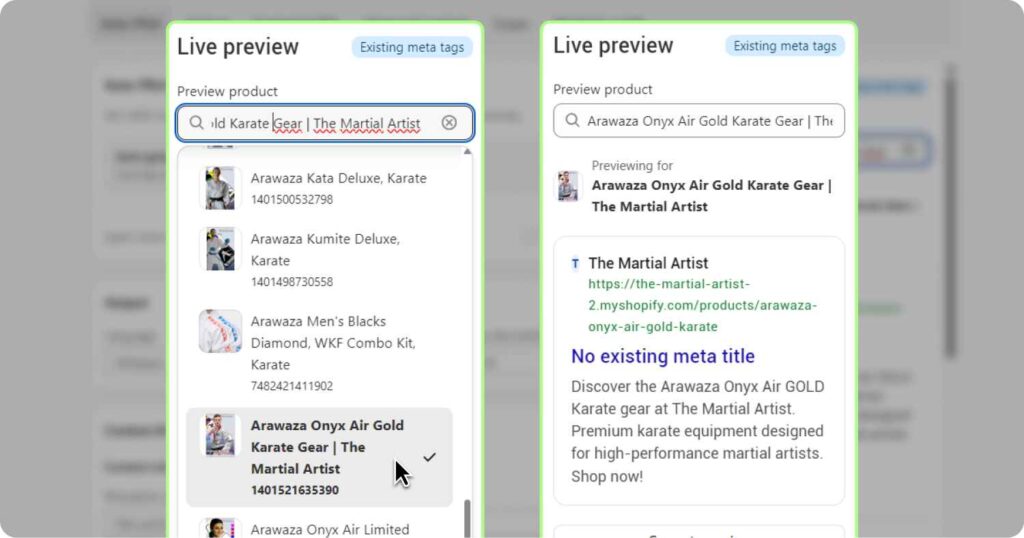
👀 Preview AI meta tags before using credits or updating Shopify
The Settings live preview now includes a searchable Shopify product picker. Choose a product, generate a preview using your current settings, and compare the AI-generated meta tags against the product’s existing Shopify meta tags.
Why it matters: You can test tone, marketing mode, SEO keyword strategy, and unsaved setting changes before committing anything to Shopify — and without consuming credits.
Where to find it: Settings → Live preview
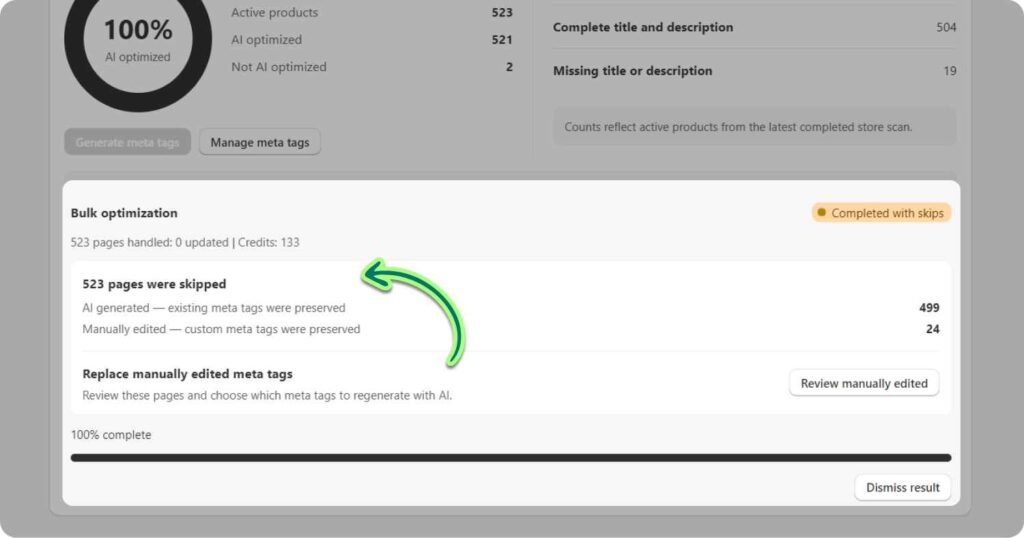
📋 Bulk generation now explains what was skipped — and why
Bulk AI meta tag generation now gives clearer feedback when products are skipped. The progress viewer distinguishes between products that were manually edited and products that already had AI-generated meta tags.
Why it matters: Merchants can better understand what the app is doing, avoid accidental overwrites, and preserve carefully written manual SEO work.
Where to find it: Meta Tags → Bulk generation progress
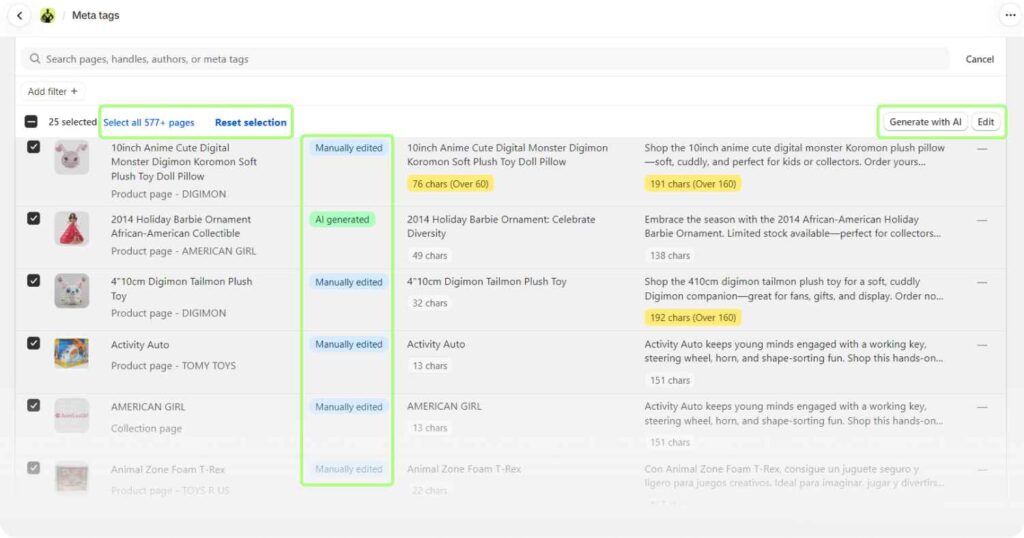
🛡️ Review and apply AI-generated meta tags more confidently
The Meta Tags table workflow has been improved to better guide users through reviewing AI-generated meta tags and applying them. Navigation and filtering around review states are clearer, especially when checking generated results or manually edited items.
Why it matters: SEO work is easier to audit before publishing, which reduces mistakes and gives teams more control over what goes live.
Where to find it: Meta Tags table
⚡ Less waiting after bulk updates and page navigation
SEO HERO AI Meta Tag Generator now avoids unnecessary full-store scans after generating product meta tags from the Meta Tags table. Bulk updates also stream into the local table data more smoothly, with a fallback scan only when needed.
Why it matters: After generating meta tags, merchants can get back to reviewing and applying SEO improvements faster instead of waiting for the app to rescan the store.
Where to find it: Meta Tags table → Bulk generation
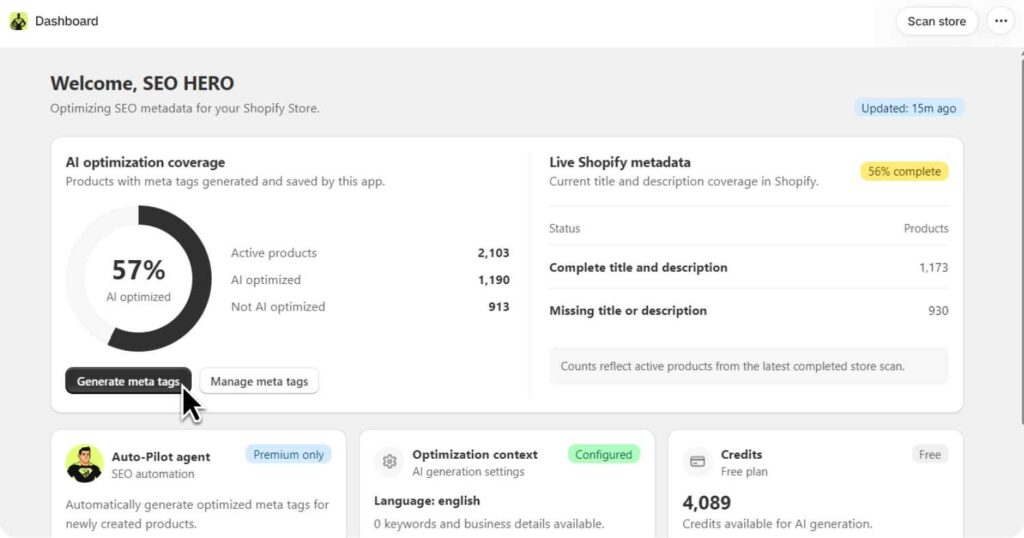
🎨 A redesigned dashboard for clearer SEO progress
The SEO HERO AI Meta Tag Generator dashboard has been redesigned to better match the meta tag workflow and help merchants understand their optimization status more quickly.
Why it matters: A clearer dashboard helps store owners see where SEO work stands and what to do next, especially when managing a large catalog.
Where to find it: Dashboard
🔧 Smaller fixes and improvements
- Fixed an issue where launching the app after several hours could show an error banner.
- Fixed Shopify plan purchase retries that could leave some users stuck during checkout.
- Improved paid plan access handling after subscription cancellation, so access can remain active through the billing period.
- Added clearer USD labels on pricing actions.
- Improved app stability during runtime errors and bulk meta tag processing.
- Improved recovery of bulk meta tag updates when reopening the app.
Open SEO HERO in Shopify to create titles and meta descriptions in bulk, review AI-generated results, or adjust your SEO strategy settings.

Hey, I’m Mike Belanger, a business enthusiast with over 15 years of experience in designing, web and app development, business management, digital marketing, customer psychology and optimizing businesses. I love making businesses grow and operate smoother.